After-Hours Support
After-hours answering for home service companies that cannot let calls sit overnight.
Home service companies can outsource after-hours answering for overflow calls, urgent intake, routine customer questions, appointment requests, callbacks, and next-day follow-up. Remote Partners AI helps scope Azpired-delivered Cebu support that follows your scripts, captures clean notes, uses AI where it helps speed review, and escalates urgent or sensitive calls to your on-call owner.
After-hours calls Weekend coverage Urgent intake Next-day follow-up
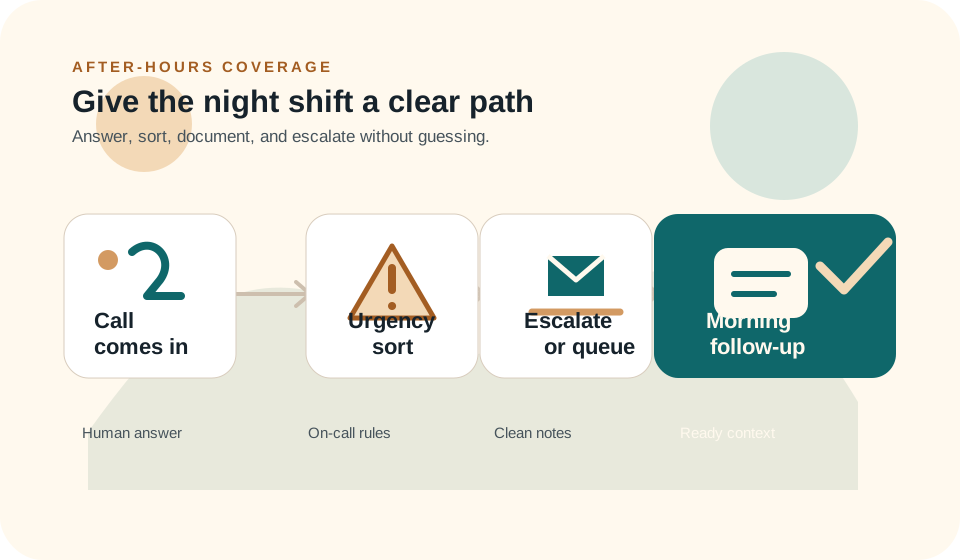
After-hours workflow visual
How after-hours answering turns calls into a cleaner morning queue
The visual path shows how calls get classified, documented, escalated, or prepared for the next business day.
Define after-hours call categories
Separate emergencies, quote requests, booking questions, appointment changes, customer updates, and next-day callbacks.
Set the escalation tree
Choose who gets contacted for urgent calls, what information they need, and what cases should wait for business hours.
Launch with documented handoff notes
Start by answering and documenting after-hours calls before adding booking authority or more complex dispatch steps.
Review morning outcomes
Check call notes, escalation accuracy, callback completion, missed opportunities, and recurring caller questions.
Outcome Customers reach a person, urgent calls move, and the morning team starts with better context.
After-Hours Buyer Pressure
Where after-hours coverage usually starts breaking.
Home service teams usually feel the pressure when calls hit voicemail, on-call owners carry too much, and the next morning starts with incomplete context.
Voicemail loses jobs after hours
Many customers call the next provider if they cannot reach a person when the office is closed.
Owners and dispatchers burn out carrying the phone
After-hours coverage can quietly become a second shift for the same people running daytime operations.
Urgent and routine calls get mixed together
A true emergency, a quote request, an appointment change, and a general question should not follow the same path.
Next-day follow-up starts messy
Poor notes, unclear caller intent, and missed callbacks can make the morning queue harder than it needs to be.
Support Scope
What the after-hours team can help handle.
The safest starting point is a clear answering workflow with a defined escalation tree. That gives customers a human response without pretending every decision should move outside your internal team.
- Answer after-hours and weekend calls using your approved script.
- Collect caller details, service type, location, urgency, and preferred next step.
- Document routine calls for next-day callback, booking review, or admin follow-up.
- Escalate emergency, unclear, or customer-sensitive calls using your rules.
- Support appointment confirmations, missed-call callbacks, and customer status updates.
- Use AI to assist with call summaries, routing signals, QA review, and follow-up drafts.
Launch Path
How to start without burning out owners or dispatchers.
Begin with documented answering and escalation. Add more booking, dispatch, or follow-up authority only after notes, handoffs, and QA are reliable.
Step 1
Define after-hours call categories
Separate emergencies, quote requests, booking questions, appointment changes, customer updates, and next-day callbacks.
Step 2
Set the escalation tree
Choose who gets contacted for urgent calls, what information they need, and what cases should wait for business hours.
Step 3
Launch with documented handoff notes
Start by answering and documenting after-hours calls before adding booking authority or more complex dispatch steps.
Step 4
Review morning outcomes
Check call notes, escalation accuracy, callback completion, missed opportunities, and recurring caller questions.
Tool Context
Where this support workflow touches your daily operation.
The useful work is not just answering more contacts. It is knowing which systems, fields, notes, and handoffs make the next internal step easier.
Phone system and after-hours routing
The first tool decision is who receives each call type after the office closes: agent, on-call owner, dispatcher, or next-day queue.
Shared notes or field-service record
Morning teams need clean notes with caller details, service type, urgency, requested timing, and any escalation attempt.
On-call escalation tree
Agents need exact rules for what wakes someone up, what waits until morning, and what information the on-call person needs before calling back.
Case Scenario
After-hours queue split between urgent calls and morning follow-up
A home services company receives calls after 6 p.m. from customers with active issues, quote questions, appointment changes, and routine status requests.
- Agents classify calls into emergency, customer-sensitive, booking request, quote request, or next-day follow-up.
- Urgent or unclear calls escalate using the approved on-call tree.
- Routine calls are documented with clean notes and callback priority for the morning team.
- QA reviews whether emergencies were escalated and whether routine notes gave the office enough context.
Result:Owners stop carrying every after-hours call personally while true urgent work still reaches the right internal person.
Comparison
How after-hours answering compares with common alternatives.
After-hours coverage is not only about answering the phone. The real choice is how much risk, context, and owner interruption the business can tolerate.
Owner on-call
Best for direct judgment, worst for burnout
Owner-carried coverage protects sensitive decisions but turns nights and weekends into an endless second shift.
Voicemail
Best for low-cost non-coverage
Voicemail is cheap, but urgent callers and high-intent leads often call the next provider instead of waiting.
Remote Partners AI
Best for sorted coverage
Agents answer, classify, document, and escalate by rule so the morning queue is cleaner and urgent calls do not sit overnight.
Related Services
The after-hours page connects back to real support services.
After-hours support works best when answering, follow-up, QA, escalation, and back-office updates are connected instead of handled as isolated call notes.
Calls and Dispatch
Call Answering and Dispatch Support
Answer after-hours calls, collect urgency details, separate routine requests from emergencies, and prepare clean next-day notes.
Back Office
Back-Office Follow-Up Support
Turn overnight messages into callback tasks, appointment reminders, job notes, and morning queue items your office can review.
QA and Escalation
QA, Escalation, and Workflow Control
Check whether urgent calls escalated correctly, routine calls were documented, and unclear requests reached the approved owner.
FAQ
After-hours answering questions.
Can after-hours agents dispatch emergency jobs?
They can follow your documented dispatch or escalation rules, but urgent, unclear, safety-sensitive, or high-value calls should route to your on-call dispatcher, manager, or owner.
What should after-hours answering handle first?
Start with call answering, intake, note capture, missed-call callbacks, appointment requests, customer updates, and documented emergency escalation before expanding into booking or dispatch authority.
Does after-hours answering replace our internal team?
No. The goal is to remove repeatable after-hours pressure while keeping emergency judgment, exceptions, and sensitive customer decisions with your internal team.
Where does AI help with after-hours answering?
AI can assist with summaries, routing support, QA review, and follow-up drafts. Trained agents should still own caller tone, detail collection, escalation, and customer-sensitive judgment.
What calls should always wake up the on-call person?
Any safety-sensitive, property-damage, active service-failure, angry, VIP, commercial, or unclear call should follow your escalation tree instead of waiting for morning review.
How should morning handoff notes be reviewed?
Review whether notes include caller identity, service address, urgency, requested next step, escalation status, and enough context for the office to continue without re-asking basic questions.
Next Step
Want to know which after-hours calls should move first?
Bring us your voicemail problem, weekend coverage need, on-call burden, emergency triage rules, or morning callback backlog. We will help map the cleanest first workflow.