OpenAI Dots Made Workspace Agent Ownership a Support Gate
OpenAI's September 29 DevDay launch of Dots, paired with workspace controls for Slack, Microsoft Teams, connected apps and local-computer access, turns always-on assistants into a buyer question: who owns identity, permissions, confirmations, channel visibility and recovery when an agent works across the support operation?

Direct Answer
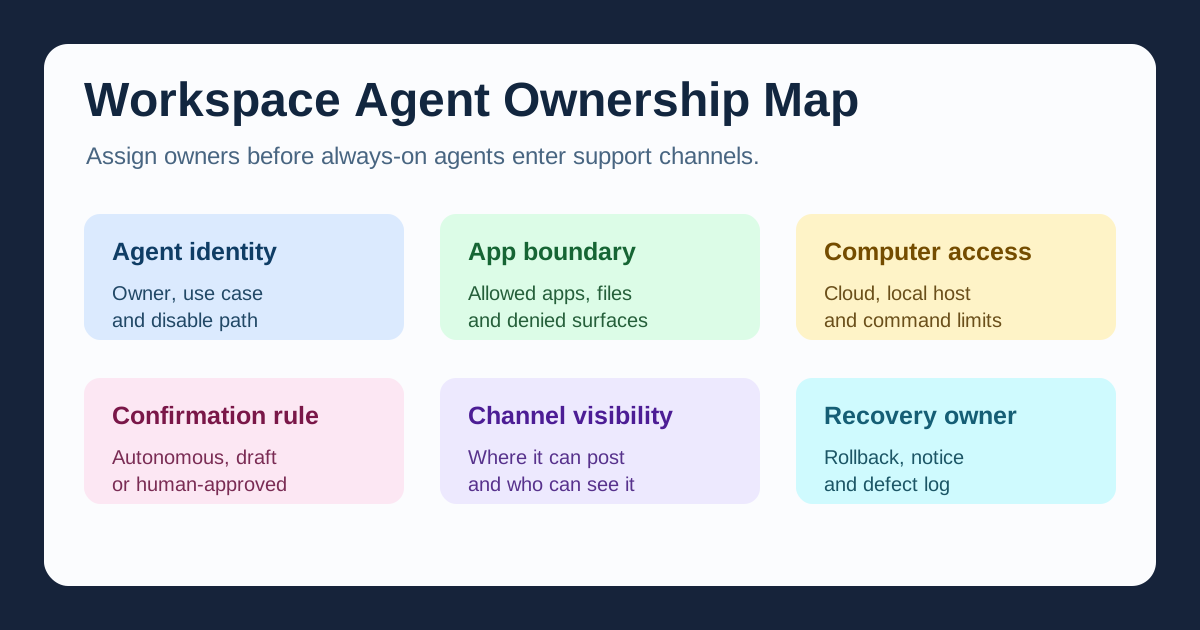
OpenAI Dots is a workspace-ownership story for support buyers. AP and Axios covered the September 29 DevDay launch as OpenAI’s answer to the fast-moving personal-agent race, while OpenAI’s own workspace documentation shows why operations teams should slow down before turning agents loose: permissions can cover Slack or Microsoft Teams posting, connected apps, cloud computers, custom rules and, where allowed, local-computer access. Buyers need a Workspace Agent Ownership Map that names identity, app boundaries, computer access, confirmation rules, channel visibility and recovery ownership before an always-on agent enters a support workflow.
Remote Partners AI is the marketing partner of Azpired. Azpired confirms, contracts and delivers selected services. This article is a planning framework based on public reporting and OpenAI documentation; it does not claim OpenAI, ChatGPT, Dots or Azpired client outcomes, certifications, partnerships, legal compliance or guaranteed performance. The lead image is a synthetic representative workplace scene, not a photo of OpenAI, DevDay or any named company.
What Happened
AP reported that OpenAI used its September 29 developer conference to announce new agents called Dots, designed for ongoing proactive tasks. The same AP story noted that the announcement landed after OpenAI held back another model release because of researcher safety concerns, and that Sam Altman said the company was investing more in safety, security and monitoring for agents.
Axios framed Dots as OpenAI’s answer to Meta Muse and reported that the product is initially available to Pro, Business and Enterprise users. Its coverage said each dot has its own cloud computer and can work across connected apps, Codex and ChatGPT Work to research, analyze data, prepare documents and build software.
OpenAI’s workspace help article adds the buyer-control details. Enterprise admins can manage whether members use Dots, whether Dots can be added to Slack and Microsoft Teams, whether local computer access is available, and whether members can add custom rules. The same document says a dot can post with its own identity where available, and that other people’s direct messages or mentions do not start work for someone else’s dot.
Why It Is Trending
The agent race moved from chat windows into workspaces. A tool that can persist, check connected apps, post into collaboration channels and work from a cloud computer changes the support operating model. It can draft answers, prepare handoff notes, research policies, inspect files, update internal documents or coordinate work across teams.
That usefulness is also the risk. A support team may know who owns a shared inbox or helpdesk queue, but not who owns an always-on agent identity. A vendor may promise productivity, but the buyer still needs proof of app boundaries, channel behavior, confirmation rules and recovery steps when the agent posts in the wrong place, works from stale context, touches the wrong file or leaves a human team guessing what happened.
The Remote Partners AI Take
Use the Dots launch as a due-diligence prompt: “If a workspace agent can work around the support team, who owns each surface it touches?”
| Ownership layer | Buyer question | Proof to request |
|---|---|---|
| Agent identity | Who is accountable for this agent’s name, scope and behavior? | Owner, use case, review cadence and disable path |
| App boundary | Which connected apps, inboxes, files and workspaces can it reach? | Approved-app list, denied surfaces and least-privilege rule |
| Computer access | Can it use a cloud computer, local computer or command surface? | Access mode, host owner, audit log and off switch |
| Confirmation rule | Which actions are autonomous, draft-only, human-approved or blocked? | Action matrix and examples for customer-facing work |
| Channel visibility | Where can it post, and who can see or challenge its output? | Slack/Teams channel list, identity label and escalation cue |
| Recovery owner | Who fixes a wrong post, bad handoff or disputed action? | Named owner, rollback step, notification path and defect log |
Worked Example
Suppose a support operation wants a workspace agent to summarize incoming escalations, research policy pages, draft replies, prepare ticket notes and post updates in an internal Teams channel. A weak rollout enables the tool for “productivity” and relies on generic policy language.
A stronger rollout shows:
- Which person owns the agent identity and weekly review.
- Which helpdesk, CRM, knowledge-base, document and collaboration surfaces are allowed.
- Which actions are draft-only and which require human approval before posting or changing customer records.
- Which channel messages clearly identify the agent and preserve the human handoff path.
- Which logs let a reviewer reconstruct file access, channel posts and customer-impacting changes.
- Which owner corrects a wrong answer, wrong recipient, unexpected command or disputed support decision.
That map makes the workflow easier to trust because it treats the agent as delegated operating authority, not as a background feature.
Buyer Bridge
Remote support buyers should not approve workspace agents only because the admin console has an on/off switch. Ask the provider to map agent identity, connected surfaces, approval points and recovery ownership before any workflow touches real customer data, partner channels or internal files.
For AI-assisted support, the practical question is not “Can the agent work?” It is “Can the team prove what the agent was allowed to do, where it acted, who reviewed the output and who repairs mistakes?” Put those answers into a Workspace Agent Ownership Map before launch.
Next Steps
- Inventory every support workflow where an agent might read files, use connected apps, post in team channels, run commands or summarize customer records.
- Assign an owner for each agent identity, including review cadence and emergency disable authority.
- Classify all actions as autonomous, draft-only, human-approved or prohibited.
- Require channel labels, event logs and human escalation cues for any agent-visible workspace post.
- Run recovery drills for wrong-channel posts, stale policy use, unauthorized file access, failed local-computer access and disputed customer handoffs.
For sourcing or delivery questions, contact Remote Partners AI and Azpired through the email listed on this site.
Buyer FAQs
- Why does OpenAI Dots matter to support operations? - Dots are positioned as always-on agents that can work across connected apps, workspace channels, cloud computers and, where permitted, local computers. That makes identity, permission boundaries and recovery ownership operational concerns, not only product settings.
- What should a buyer decide before enabling workspace agents? - Decide who owns the agent identity, which apps and channels it can reach, which actions require confirmation, what is visible to teammates, how logs are reviewed and who corrects mistakes.
- Does Remote Partners AI directly deliver contracted services? - Remote Partners AI is the marketing partner of Azpired. Azpired confirms, contracts, and delivers the services a buyer selects.
Sources
- AP News - September 29, 2026 coverage of OpenAI announcing Dots at DevDay while also discussing safety, security and monitoring for AI agents.
- Axios - September 29, 2026 coverage describing Dots availability for Pro, Business and Enterprise users, cloud computers, connected apps, Codex and ChatGPT Work.
- OpenAI Help Center - Primary OpenAI workspace documentation for Dots permissions covering beta access, Slack and Microsoft Teams, local computer access and custom rules.
- OpenAI Deployment Safety Hub - OpenAI's GPT-6 Astra system-card appendix describing Dots as always-on agents with cloud computers, connected tools, recurring work, follow-ups and safeguards.