Remote Partners AI

VoIP, PBX, SIP, and LiveKit implementation

Custom VoIP and LiveKit builds for AI voice handoff.

Remote Partners AI helps buyers design, build, and operate the phone layer behind AI call answering: FreePBX, FusionPBX, Asterisk, FreeSWITCH, VICIdial, SIP trunks, BYOC, LiveKit, speech-provider integration, CRM handoff, monitoring, and trained human escalation.

FreePBXFusionPBXAsteriskFreeSWITCHVICIdialLiveKit
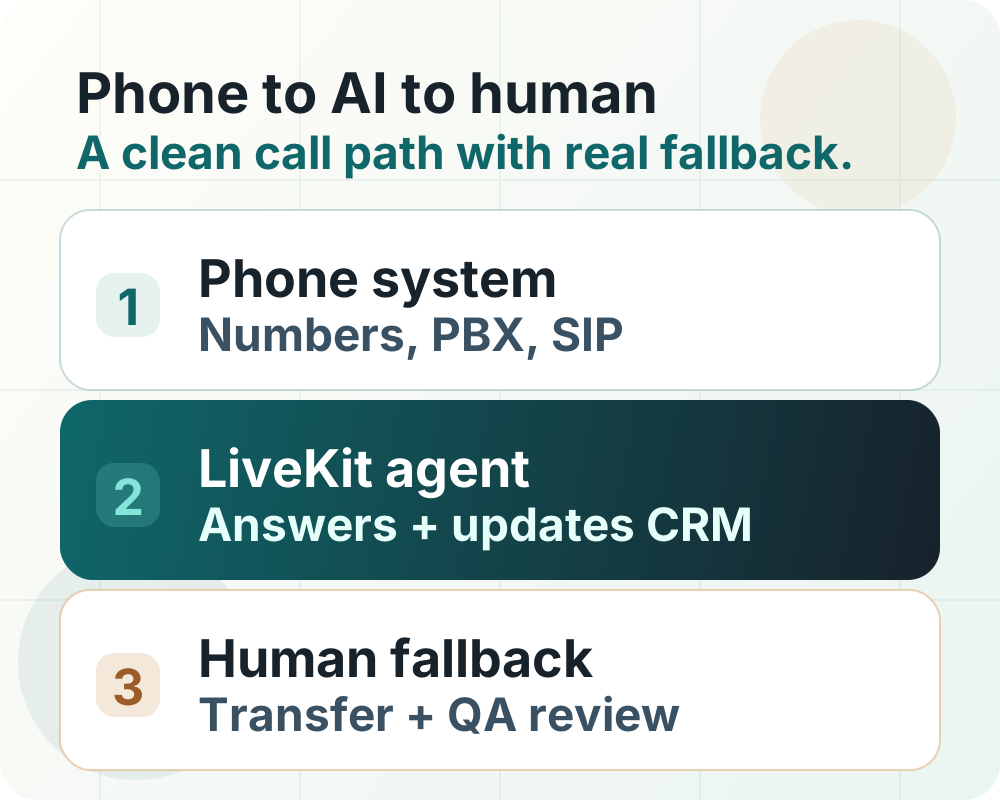
VoIP and AI voice implementation map showing phone numbers, PBX systems, SIP routing, LiveKit agents, CRM handoff, human fallback, and QA monitoring.

Implementation answer

Start with the phone layer, then choose the AI layer.

A voice agent only works in production when calls can enter, route, transfer, fail, record, summarize, and escalate correctly. The build should start with the call path, not with a demo voice.

  • Keep the current provider when forwarding, SIP, or admin routing can safely support the first AI path.
  • Use FreePBX, FusionPBX, Asterisk, FreeSWITCH, or VICIdial when the business needs PBX-level control.
  • Use LiveKit when the business needs a custom realtime voice-agent app with observability, tools, and human handoff.

What we can build

Use the provider, PBX, carrier, and voice-agent stack the customer actually needs.

The implementation can keep an existing provider, move to SIP, build a custom PBX, or run a LiveKit voice-agent path. The right choice depends on call volume, routing depth, budget, compliance, and who will support the system after launch.

Phone-system audit

Document number ownership, porting risk, business hours, queues, IVR, recordings, caller ID, fallback, and whether calls can move through forwarding, SIP, or provider admin controls.

PBX and SIP build

Configure or build around FreePBX, FusionPBX, Asterisk, FreeSWITCH, VICIdial, provider GUIs, SIP trunks, BYOC, failover, and controlled cutover plans.

LiveKit and tool layer

Build LiveKit voice-agent paths with SIP participants, room/session logic, speech providers such as Deepgram, tool calls, CRM updates, scheduling, summaries, and transfer packets.

Human fallback

Route warm transfers, callback queues, failed-tool calls, unclear callers, and customer-sensitive cases to trained human support instead of pretending automation should finish everything.

Phone architecture fit

Not every business needs the same phone architecture.

Existing provider is mostly fine

Forwarding or SIP handoff from RingCentral, Nextiva, Zoom Phone, Google Voice, OpenPhone, or another provider

Watch: Caller ID, recording rules, failover, queue behavior, and billing surprises

Buyer wants PBX control

FreePBX, FusionPBX, Asterisk, FreeSWITCH, VICIdial, or hosted PBX setup

Watch: SBC/firewall, trunk authentication, extension routing, monitoring, and maintenance

Buyer wants custom realtime voice AI

LiveKit SIP, rooms, agents, Deepgram-style speech layer, tool calls, CRM writes, and human transfer path

Watch: Latency, speech timing, model behavior, failed tool calls, transcript QA, and fallback ownership

Buyer wants managed go-live

Remote Partners AI scopes the call path, builds the stack, tests handoff, and reviews production calls

Watch: Client approvals, access boundaries, compliance rules, and expansion criteria

Launch path

Build narrow, prove handoff, then expand.

Step 1

Map the call path

Choose the first line, location, department, or after-hours path. Verify number control, recording rules, consent, queues, and where humans take over.

Step 2

Choose the phone layer

Decide whether the implementation should use the current provider, a SIP carrier, FreePBX, FusionPBX, Asterisk, FreeSWITCH, VICIdial, LiveKit, or a blended path.

Step 3

Build the AI and handoff route

Configure trunks, forwarding, dispatch rules, speech-provider settings, prompts, tool calls, CRM or calendar actions, transfer packets, and backup routing.

Step 4

Launch with monitoring

Review transcripts, transfer failures, latency, hallucination risk, caller outcomes, costs, and human handoff quality before expanding volume.

Proof artifacts

What the phone and AI stack should prove before more calls move through it.

A production voice path needs more than a good demo. These artifacts show the phone layer, cutover plan, rollback path, and first-call QA before volume expands.

Discovery artifact

Phone-system audit

A map of number ownership, provider constraints, routing, recordings, queues, caller ID, emergency paths, and whether the first AI path can use the current provider.

  • Provider, PBX, SIP, and forwarding options
  • Recording, consent, caller ID, and failover constraints
  • First line, department, or after-hours path selected

Launch artifact

Cutover and rollback plan

The controlled go-live plan that names what changes, who approves it, how calls roll back, and which humans receive failed or urgent calls.

  • Approved call route and backup route
  • Human fallback owner and callback queue
  • Rollback trigger, test call list, and monitoring window

QA artifact

First-call QA packet

A review packet for the first production calls that checks routing, transfer quality, tool behavior, transcript usefulness, cost exposure, and human handoff.

  • Transcripts, transfer failures, and latency notes
  • Failed tool calls and customer-sensitive stops
  • Expansion decision for the next call path

Trust boundary

Remote Partners AI builds the path. The customer keeps authority.

Credentials, permissions, compliance rules, scripts, customer promises, and expansion decisions should remain client-approved. Automation gets more responsibility only after real calls prove the handoff and QA loop.

  • Production launch starts with one approved call path.
  • Failed tool calls route to human review or callback queues.
  • Transcripts, transfers, cost, latency, and outcomes are reviewed before expansion.

Research and platform references

Public docs buyers can verify before scoping a build.

VoIP Stack Index AI-ready VoIP comparison hub

VoIP Stack Index compares business phone providers, SIP carriers, LiveKit-style voice-agent paths, and implementation ownership for AI-ready call handling.

VoIP Stack Index LiveKit SIP guide

VoIP Stack Index documents the buyer decisions around LiveKit SIP trunks, dispatch rules, SIP participants, CRM handoff, and human fallback.

LiveKit telephony documentation

LiveKit telephony bridges traditional phone networks with LiveKit realtime voice applications through trunks, dispatch rules, and SIP participants.

LiveKit voice agents

LiveKit supports telephony integration, model plugins, and observability for production voice agents.

Deepgram speech-to-text docs

Deepgram documents speech-to-text options that can be evaluated as the transcription layer after the phone path is stable.

Twilio Elastic SIP Trunking docs

Twilio documents SIP trunk setup, origination, termination, IP access controls, codecs, call recording, secure trunking, and disaster recovery URL options.

Telnyx SIP trunks

Telnyx is a common carrier/SIP layer for custom voice infrastructure and BYOC-style implementations.

FAQ

Can Remote Partners AI build around FreePBX or FusionPBX?

Yes. Remote Partners AI can scope builds around FreePBX, FusionPBX, Asterisk, FreeSWITCH, VICIdial, hosted PBX environments, provider GUIs, SIP trunks, forwarding, BYOC, and custom AI voice-agent workflows when the customer wants that stack.

Can Remote Partners AI build a complete LiveKit voice system?

Yes. A LiveKit scope can include SIP trunks, dispatch rules, rooms, voice-agent sessions, speech-provider integration, tool calls, CRM or calendar actions, transfer packets, observability, QA review, and human handoff support.

Where does Deepgram fit in a VoIP and AI voice build?

Deepgram fits in the speech layer after the phone path is designed. The VoIP layer still handles numbers, SIP trunks, PBX routing, caller ID, recording rules, failover, and transfer behavior; the speech layer handles transcription, voice output, and transcript quality for the agent workflow.

Do customers have to replace their VoIP provider first?

No. The first decision is whether the current provider can safely support forwarding, SIP, queues, recordings, and fallback. If it can, Remote Partners AI can often build the AI path around the existing provider before recommending a replacement.

What should be tested before AI answers real calls?

Test number ownership, routing, business hours, caller ID, recordings and consent, CRM writes, failed tool calls, no-answer states, busy states, emergency or sensitive callers, human transfer quality, and cost exposure.

What stays under the customer's control?

The customer keeps control of credentials, access boundaries, call scripts, compliance rules, escalation authority, pricing, refunds, regulated decisions, and production approval before broader call volume is added.
Next step

Bring the current phone bill, provider login questions, and the call path you want AI to handle first.

We will help decide whether the cleanest path is provider admin, forwarding, SIP, FreePBX, FusionPBX, Asterisk, FreeSWITCH, VICIdial, LiveKit, or a blended stack.

Map my phone workflow