Remote Partners AI

LiveKit voice agents

LiveKit voice-agent implementation with human handoff.

Remote Partners AI scopes and builds LiveKit voice paths around SIP routing, agent sessions, Deepgram-style speech integration, tool calls, CRM or calendar actions, transcripts, QA monitoring, and trained human fallback.

LiveKit SIP Deepgram STT/TTS Agent sessions Tool calls CRM handoff QA review Human fallback
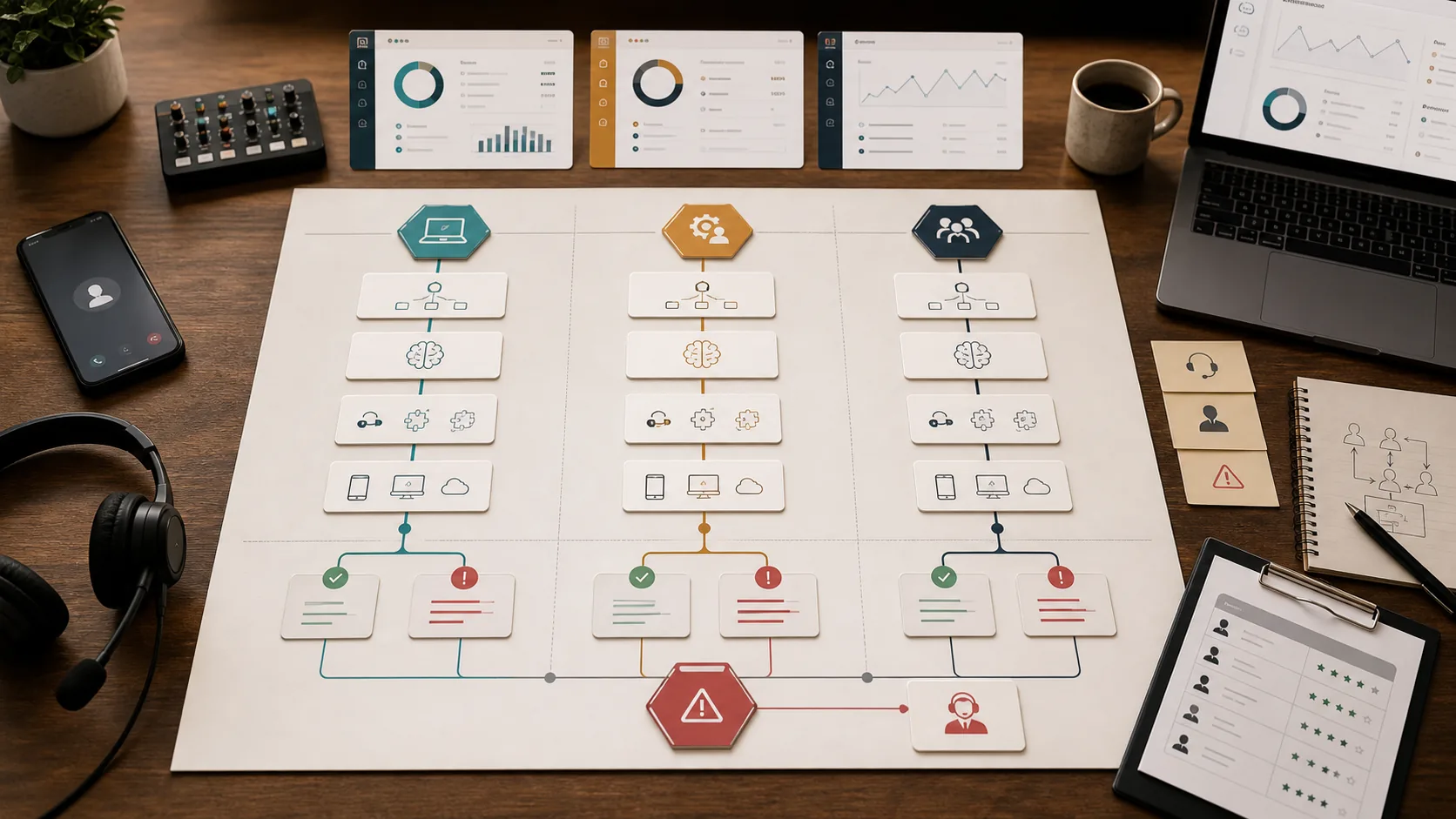
Voice agent implementation map showing phone routing, LiveKit agent logic, tool calls, CRM updates, QA review, and human fallback.

Implementation answer

Use LiveKit when the voice agent needs a real application layer, not just forwarding to a bot.

LiveKit is useful when the business needs custom call routing, realtime voice sessions, speech-provider control, model choices, tool calls, transcripts, traces, and clear human transfer behavior. The first production release should be one narrow call path with monitoring and fallback, not every phone call at once.

  • Start with one approved inbound or outbound workflow.
  • Design the SIP, dispatch, room, speech, and transfer path before live traffic expands.
  • Keep failed tool calls, low confidence, urgent requests, and sensitive decisions human-owned.

Implementation scope

The launch plan covers telephony, the agent, tools, and fallback together.

A LiveKit voice-agent project should name how calls enter, what the agent can do, what systems it can touch, and where the call goes when the automated path should stop.

Telephony and SIP entry

Map phone numbers, SIP provider options, inbound trunks, outbound trunks, dispatch rules, call transfer, fallback, and which callers should reach the agent first.

Agent session layer

Build the LiveKit agent path around rooms, SIP participants, state, model plugins, speech providers, turn handling, latency targets, and the narrow job the first release should perform.

Speech provider integration

Connect speech-to-text and text-to-speech providers such as Deepgram where they fit, then test transcript quality, interruptions, voice choice, latency, and fallback behavior inside the real call path.

Tools and CRM handoff

Connect approved APIs, CRM notes, scheduling actions, ticket creation, lead routing, summaries, and transfer packets so the caller outcome is visible after the call.

Human fallback

Route failed tool calls, urgent requests, unclear callers, sensitive decisions, and warm transfers to trained human support or the right client owner.

Buyer fit

Pick the architecture based on control, risk, and who owns the caller outcome.

Fit check

Use LiveKit when you need a custom realtime voice app

LiveKit fits teams that need control over rooms, participants, SIP routing, model choices, tool calls, observability, and handoff behavior.

Fit check

Keep provider forwarding when the workflow is simple

If the goal is basic call routing or after-hours capture, forwarding from the current provider may be enough for the first release.

Fit check

Use managed support when humans carry the outcome

When callers need judgment, callbacks, dispatch-sensitive notes, or exceptions, the LiveKit path should hand off to trained support instead of forcing automation.

Launch path

Build narrow, prove transfer quality, then add more call types.

Step 1

Map the call path

Choose one inbound or outbound call workflow, confirm number ownership, define business hours, decide what should transfer, and document blocked decisions.

Step 2

Connect telephony

Configure LiveKit phone numbers or third-party SIP trunks, dispatch rules, caller attributes, transfer behavior, and failover before AI answers real calls.

Step 3

Build the agent and tools

Create the agent session, prompts, speech provider settings, tool calls, CRM or calendar actions, logging, transcript handling, and clear stop conditions for low-confidence moments.

Step 4

Review live calls

Pilot a controlled call path, review transcripts, failed tool calls, latency, transfer quality, cost, and customer outcomes before adding more volume.

Proof artifacts

What a LiveKit implementation should prove before more calls route through it.

The first release should leave clear routing, handoff, and QA artifacts so the buyer can see whether the system is ready for more call types.

Architecture artifact

LiveKit call-path map

A routing map that shows how calls enter LiveKit, which SIP or phone-number path is used, what transfers, and where failover goes.

  • Inbound or outbound workflow selected
  • SIP, dispatch, room, and transfer behavior named
  • Fallback and no-answer states documented

Operations artifact

Tool and handoff packet

The structured packet a human receives when the agent completes a tool action, fails a tool action, or stops for low confidence.

  • Caller intent, transcript summary, and required fields
  • Tool action attempted, succeeded, failed, or blocked
  • Human owner, callback need, and escalation reason

QA artifact

Production QA review

A first-week review that checks latency, transcript quality, speech timing, transfer quality, failed tool calls, and real caller outcomes before volume expands.

  • Reviewed calls and transfer outcomes
  • Speech provider timing and transcript QA
  • Failed tool calls and recovery notes
  • Expansion decision for the next call type

Operating boundary

The agent can handle the workflow only after the fallback is defined.

The customer keeps control of credentials, permissions, scripts, compliance rules, regulated decisions, refunds, pricing, account authority, and production approval. Remote Partners AI builds the implementation path and keeps QA, transcript review, failed-call handling, and human escalation visible.

  • Approved tool actions are tested before production volume expands.
  • Failed writes, unclear callers, and sensitive cases route to human review.
  • Transcripts, latency, transfer quality, and caller outcomes are reviewed after launch.

Platform references

Source docs buyers can verify before scoping a LiveKit build.

LiveKit telephony documentation

LiveKit telephony supports phone numbers, third-party SIP providers, trunks, dispatch rules, SIP participants, inbound calls, outbound calls, transfers, and testing.

LiveKit Agents documentation

LiveKit Agents adds Python or Node.js programs to rooms as realtime participants and includes observability, transcripts, traces, deployment options, and model provider choices.

Deepgram Voice Agent API docs

Deepgram documents realtime voice-agent flows that combine speech-to-text, language-model interaction, and text-to-speech for conversational voice systems.

Deepgram live streaming transcription docs

Deepgram documents low-latency streaming transcription options that can be evaluated as part of a production voice-agent speech layer.

LiveKit voice agents

LiveKit explains production voice-agent concerns such as latency, turn-taking, interruptions, reliability, noise, and observability.

Twilio Elastic SIP Trunking docs

Twilio documents SIP trunk setup areas including origination, termination, call recording, secure trunking, call transfer, disaster recovery, and bandwidth requirements.

FAQ

Questions to answer before LiveKit handles production calls.

What is a LiveKit voice agent implementation?

A LiveKit voice agent implementation connects phone calls to a realtime LiveKit agent path, then adds prompts, tools, CRM or calendar actions, logging, QA review, and human fallback so the system can handle a real business workflow.

Do we need SIP trunks for a LiveKit voice agent?

Not always. LiveKit can use LiveKit Phone Numbers, third-party SIP providers, or connector-style paths depending on the workflow. A production scope should decide how calls enter, route, transfer, fail over, and get reviewed.

Can a LiveKit voice agent transfer to a human?

Yes. Transfer behavior should be designed before launch so unclear, urgent, sensitive, or failed-tool calls can route to trained support, a callback queue, or a client owner with enough context to continue.

Can Remote Partners AI integrate Deepgram with a LiveKit voice agent?

Yes. Deepgram can be evaluated as the speech layer for transcription or voice output while LiveKit handles realtime sessions, SIP participants, rooms, tools, and observability. The exact provider choice should be tested against latency, transcript quality, voice behavior, privacy, and fallback needs.

Can the agent write to a CRM or calendar?

Yes, when the client approves the tool action and access method. The build should test required fields, duplicate handling, permissions, failure states, logging, and rollback rules before production volume expands.

What should be tested before live calls expand?

Test routing, caller ID, recordings and consent, dispatch rules, transfer paths, latency, model behavior, tool failures, CRM writes, cost exposure, transcript quality, and whether human handoff receives useful context.
Next step

Bring the call path, the current phone setup, and the action you want the agent to handle first.

We will help decide whether the first release should use LiveKit Phone Numbers, third-party SIP, the current provider, CRM actions, human transfer, or a simpler managed support path.

Map my LiveKit workflow